


A petition to bring back buttons on phones?
Sometime about 2-3 years ago, the saturated consumer electronics industry, hungry for new but matured technology, has been exploring what we designers call “static” buttons. These “static” buttons are essentially non-mechanical (ie non-moving) and use electronic circuitry as a means to detect triggering contact.
Function or yet another fad?
I must admit when I first learnt about it, I was a big fan and jump on the band wagon in a big way. A design that I submitted to the 2006 Red-Dot Concept award had also used “static” buttons. At that time, I sat back and laughed at my cleverness!
However these days I’m not so sure, especially going through hindsight 30/30. I am starting to feel such non-mechanical buttons actually reduce the user experience rather than enhance it. Often because these static buttons are not used in a correct context and it lacks the most important thing a tactile and haptic feedback.
Before we go on lets take a quick look at the way these technology work. Currently from what I know there are 3 technologies that drive non-mechanical buttons they are Electrostatic, Pressure sensitive and Touch Screen buttons.
Electrostatic buttons are similar to the ones found in lifts. The way it works is the human finger closes the circuit thus triggering the button. Thus if you wear gloves it wont work. On of the big problems is when you have housings place in front of the buttons. If the housing is “charge” in any way it will trigger it.
Pressure sensitive buttons and dials operate like the iPod jog dial or the B&O BeoCenter 2. The circuitry senses very slight pressure on a sensitive plate and thus triggers the button. This would also mean putting it in your pocket could trigger it. This is a much more reliable technology but slightly more expensive than electrostatic buttons.
Touch screen button technology can be found on most PDAs and universal remote controls. The system uses the screen graphics to create the button icons for users to view and activate.
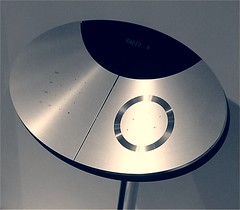
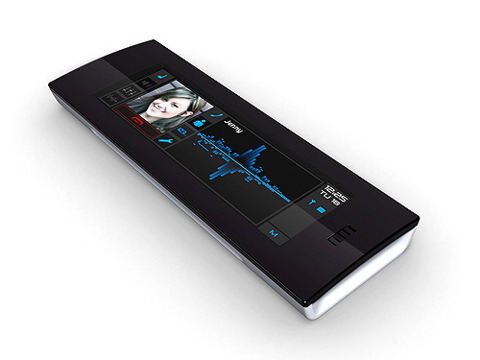
The Onyx designed by Pilotfish and Synaptics, uses sensors and “gestures” to control the phone. Can you say conductor’s wand?

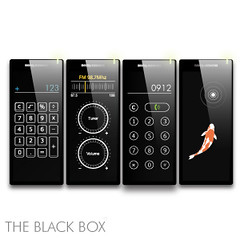
The award winning BenQ Black Box, that is making the rounds in the blogosphere as its the phone that is supposed to have an interface that allows the product to be anything. It has a touch screen surface that morphs to a mobile phone, calculator, or media player etc depending on the requirements of the user and software.
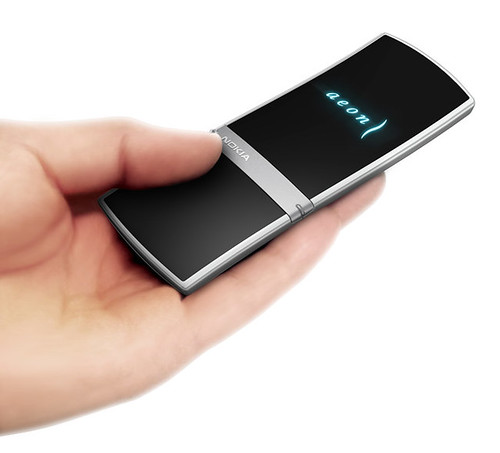
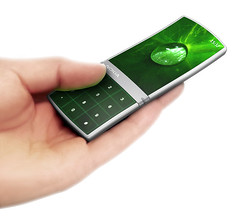
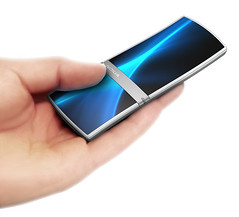
The equally slick Nokia concept mobile phone, that rides along the same idea as the Black Box.
For the purpose of this discussion, I have split the button types into mechanical and non-mechanical buttons.
Personally I am still ready to embrace the use of mechanical buttons. The reason is, nothing gives a more satisfying, direct physical feedback response than a moving cylinder that triggers a switch. It’s instantaneous and you know with its depression and haptic feedback, something will happen.
“Static” buttons on the other hand have issues with feedback. Nothing moves, so there is no action and thus no reaction. Therefore designers that use “static” buttons need to employ a host of other feedback elements, like beeping sounds or lights. This is a very software driven interface and hence prone to software based problems. (Remember the blue screen of death?) If there is even a slight lag in response time, you would leave users wondering if they hit that button hard enough or if the angle of contact is even correct.
However “Static” buttons had advantages in that it’s aesthetically pleasing, and “static” LCD buttons, have immense flexibility. I like to wrap up this post with a list of reasons on when you should or should not use “static” buttons.
Traditional Mechanical Buttons
1) In situations where a button has high frequency of use. A control for a game pad.
2) Good for single specific functions. For example an “open” button in a lift. Depressed means it will stay open.
3) Good as a “goto” button that skips over everything else. For example a “power switch”, over rides everything else.
4) Able to create nice shapes or forms that are nice details. The iPod’s circular jog dial is a good example.
5) Good usability as it is clearly demarcated where is the active area.
Non-Mechanical Buttons
1) When Aesthetic has a slightly higher priority than function.
2) With an LCD button interface, you can have a high degree of flexibility in the interface. Look at a Pocket PC PDA ability to be a phone, keyboard, media player etc.
3) You can have a buttons in places that are very thin or stacked tightly with electronics. The LG Chocolate phone buttons located on its thin top flap.
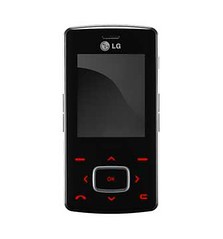
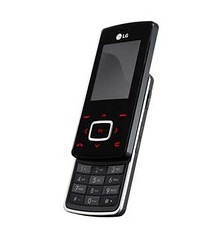
LG Chocolate, uses the pressure sensitive conductors that senses the human finger’s contact with the housing to trigger the directional “arrowed” button
In conclusion, though I’m a fan, I am still sitting on the fence when it comes to mobile phones having “static” buttons. With such small form factors, I am concern that it will be a juggling act locating the buttons in the first place as there is no demarcation of the active area. As with the small size of mobiles phones today, they are already a huge usability problem in itself, so much so that static buttons do not seem to make it any better better.
———–
Source: NOTCOT.org, Design Directory, BW Technology, Small Surfaces, mobiface, LG
Sahil
June 24, 2008 at 2:43 pmVery nice article. This has been one of the features of iPhone that has been bothering me, along with the ‘screen getting oily from you skin’ issue.
I saw this interesting Motorola phone recently which gives some amount of tactile feeling when you are pressing the button. As soon as you press any of the static,virtual buttons, the entire top surface of the phone moves down with a slight tilt towards the button you are pressing.
This almost gives you a feeling of pressing a mechanical button, but not as good though. I found it a very clever way to solve this issue with such a simple technique.
http://www.motorola.com/consumer/v/index.jsp?vgnextoid=051b505dd8e29110VgnVCM1000008206b00aRCRD&show=productHome
pauric
November 8, 2006 at 3:32 am“but as long as most of the software OS is designed by 1 party, i have doubts that it will truly be the ultra flexiability we all dream about”
Aha! well then you will be pleased to know that the ‘web as a platform’ and webOS will ensure truly democratic & marketplace driven ‘software’ solutions.
Design Translator
November 7, 2006 at 10:23 amYes that is a great combination and this new iscrybe is fantastic.
Personally, i am concern with the over reliance of software. To this date, even the pocket pc still has bugs and hangs. Palm OS is also not perfect, not to mention a WinXP based machine.
Perhaps i’m biased as i’m a product designer, but as long as most of the software OS is designed by 1 party, i have doubts that it will truly be the ultra flexiability we all dream about. Just look at itunes.
pauric
November 7, 2006 at 9:59 amWell, I guess 3 things come to mind
1)Apple have done this but not released the true ipod video. Not sure whats holding up the release??
2)there will always be a need for both me-too designs and differentiation. Most pim devices look kinda like a plam but there is still enough differentiation
3) I tend to sit in the design function over form camp. I’m less concerned about the possibility of a generic rectangle display as long as it helps people accomplish their goals.
If I had something with the form factor of a Moleskine, durability of a palmV and functionality of this: http://iscrybe.com/main/index.php (watch video) Then I wouldnt care very much that it looked like every other product… function over form.
Design Translator
November 7, 2006 at 8:37 amYes, now that is interesting.
My worry is as the rate we are going with things and with software development, we are just going to end up with rectangle displays in our pockets.
Its not that there is anything wrong with that but it would just be down right boring!
pauric
November 7, 2006 at 2:04 amI think there is advantage to keeping the physical shape generic and using some form of in-button-display to provide contextual detail when off the main menu functions. That is, a user knows the physical placement of [play][forward] etc and can use them while the device is in the pocket/blind. But when attention is needed directly on the device for some drilling or config the buttons switch meaning through the display. Eg. [play] becomes [enter]
I’m thinking of some hybrid lovechild cross between the optimus keyboard and creative zen micro for mp3players, or moto razr for phones
http://www.artlebedev.com/everything/optimus/
http://us.creative.com/products/products.asp?product=10795&category=213&subcategory=214
Design Translator
November 4, 2006 at 10:43 pmHi pauric,
Thanks for your comments. I agree with you. But I’m thinking more along the line of a button shaped as say a “+” sign for volume up.
You are right on this, the early generation ipods are electrostatic.
Thanks for the link and please keep in touch.
pauric
November 4, 2006 at 9:48 pmDesign Translator: I agree with you, but a conceivable soloution would be similar to the 3rd gen ipods. Each button is indented so I only have to run my finger over the device to find the right button, blind. A Tactile Touch screen could have ridges in applications where there are a standard set of buttons. Picture a creative zen but with a full device high display.
Also, the article states that the ipods are pressure sensitive, I’m not sure this is true, but a small point. Anyway, here is a real world ‘maker’ solution to the electrostatic design limitation when wearing gloves
http://www.instructables.com/id/E34Q98ZSHEEP287HI2/?ALLSTEPS
Design Translator
November 4, 2006 at 11:04 amHi Kyle,
Thanks for your comments. I think you have a real good point. The flexibility you get with the touch screens plus the feedback of buttons could surpass buttons. Could, but I think it will not be used in all situations.
Haptic design is not only about feedback of a button or the feeling when you depress it, its also about engaging and locating the button before you even depress.
Here is a scenario, lets say you are jogging and you have your mp3 player in your pocket or strapped to your arm. With mechanical buttons, and the way the buttons can be designed or shaped, you could feel with your fingers and determine which button is the volume and which is the track forward.
Tactile touch screens would still lack this ability.
Thus really at the end of the day it’s about the scenario of the products use and user requirements that determine what kind of buttons should be used.
Kyle
November 4, 2006 at 10:09 amI’ll second Gabriel and Timo’s comments, you can expect to see haptic touchscreens in the next year or two.
I think this approach could surpass mechanical buttons… for example, when text messaging, the device could provide varying degrees of feedback to indicate which letter or word is being selected.
Design Translator
October 30, 2006 at 9:28 pmHi Gabriel and Timo,
Thanks so much for the heads up and the links. Thats what I like about the internet, its this sharing of information that makes blogging so wonderful!
Timo
October 30, 2006 at 12:07 amThe work of Sony Interaction Labs has some interesting research on tactile feedback using Piezo film (in this case embedded in a Wacom pen, but it could also be under the display surface):
“We investigated a number of scenarios. In one scenario, the user is able to feel patterns, lines, or colors allowing the user to distinguish parts of an illustration by touch. Because the Wacom tablet tracks the pen even when it does not touch the tablet, in another scenario, the user is able to feel control points for Bezier curves before selecting them making it much easier to pick the desired control point. We also experimented with the use of tactile feedback during free-hand drawing and allowing the user to feel different colors. By combining feedback with pressure sensitivity, the user can also feel the line thickness.”
From here:
http://www.csl.sony.co.jp/person/poup/e-library/2002/siggraph2002_tactilepen.pdf
Gabriel White
October 29, 2006 at 5:25 pmWell the display doesn’t actually move, but it *feels* like you’re pressing a real mechanical button through the use of haptic feedback within the device. It’s pretty amazing stuff.
DT
October 28, 2006 at 10:15 pmHi Gabriel,
Thanks for stopping by and leaving your comments.
Now that is very cool! This technology would mean the display will actually depress when contacted or activated. Now this I have to see! Please do keep me informed when this technology is released!
Gabriel White
October 28, 2006 at 4:48 pmYou’re spot on about the haptic issue with buttons. Very soon, though, you’ll be seeing “touch screen” devices with the ability to provide identical haptic responses to that of a mechanical button. These technologies are amazingly compelling in prototypes floating around at the moment.
Once that’s available you can have all the upsides of mechanical buttons (hey, you can design on-screen buttons to be always-there), and all the flexibility a touch display affords.
Cool!